
One WMS, three screens
Back office, PDA and Workstation
Warehouse managers work in the browser, picking operators on the PDA, packing operators at the Workstation.
All three write to the same WMS the moment an action happens, so the back office shows what operators are doing in the warehouse, as they do it.
01 · Back office
The back office, for warehouse managers
The web application where warehouse managers plan, follow and bill the work. It runs in any browser, including on a phone.
Picking can be followed live: every series in progress, who is picking it and how far they are, with the pace of the day measured hour by hour.
What warehouse managers work with
Picking, live
Generate picking series and follow them on the Ongoing Series page: who is picking what, and the picking rate per hour against yesterday or the same day last year.
Sales Order Dashboard
Orders by stage, blocked orders, and the orders received since Cutoff, on one screen.
Stock and restocking
Stock by product, batch and expiry date, with the picking positions to restock and the products out of stock flagged on the dashboard.
Returns
Announce a return and generate its label before the parcel arrives, then follow its inspection item by item.
Damaged goods
Set a position to damaged: its stock stays on record, but it is never sold or picked into an order.
Invoicing and licences
Client invoicing from recorded activity, and the user, PDA and Workstation licences in use.
Exports
Orders, shipments and stock exported to a file, when you need them or on a schedule.
Every site in one account
Run one warehouse or several from the same back office. Switch between sites, or work across all of them at once.
02 · Feeds
Feeds: integrations that say what went wrong
Your clients' orders, products and receptions reach the WMS through feeds. The Feeds page follows every run, for every site, all day.
When a run fails, the page says why and what to do about it. Your clients see their own feeds too, with the same explanation, so you and they look at the same facts and a problem gets fixed faster.
What the Feeds page gives you
Today, run by run
A timeline of every run since the morning, so a failure shows up the moment it happens.
The cause and the fix
Each failure names its cause, with what to change and where.
Automatic pause
A feed that fails several times in a row stops itself, and you resume it once it is fixed.
Pause and resume
Pause a client's imports while its system is being changed, and resume them when it is ready.
What was sent, and when
When a client's system changes an order or a product, the WMS keeps each version it received, so you can show exactly what arrived and when.
Clients see their own feeds
Each client follows its own imports, so nobody has to guess whether an order reached the warehouse.
03 · Messages
Messages: reach your operators from the back office
Put the people who work together into teams, such as Picking or Packing, each with its own managers.
Managers write to one person or a whole team from any back office page. Operators ask for help, and a manager takes the request in hand without leaving the screen.
What Messages gives you
Messages and alerts
Send a message, or an alert the reader must confirm, and see who has seen or confirmed it.
Requests for help
Out of boxes, a printer problem, a damaged product: operators ask, and a manager answers.
Now, later or on repeat
Send a message now, schedule it for later, or repeat it every week or on a set day of the month.
Ready-made messages
Messages and replies prepared in advance, so operators do not have to type while they work.
Full history
See what each team sent and received, and what happened next.
Teams
Group operators and their managers. One person can belong to several teams.
04 · PDA
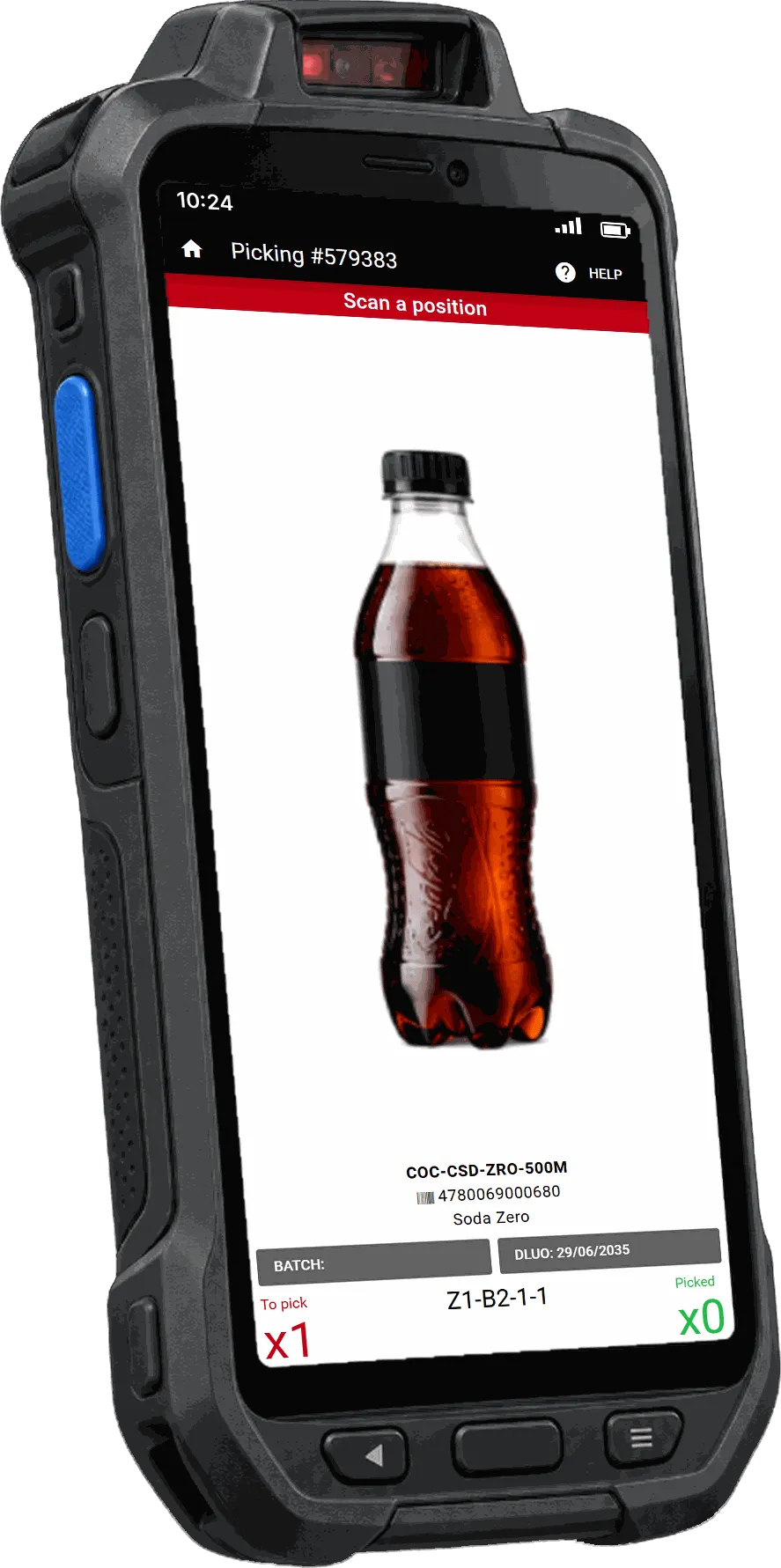
The PDA: every task guided, every step confirmed
Operators sign in with their personal badge, and the PDA takes them through each task: where to go, what to take and how many.
Each step is confirmed by scanning the right barcode, so every order leaves the aisle already checked, before it reaches packing.
What the PDA does for your warehouse
One trip per product with Fast Picking
The operator collects a product once for the whole series and splits it across each order's bin. Each bin scan confirms that the right quantity went to the right order.
Expired stock is flagged before it is picked
The PDA sends the operator to the batch that expires first (FEFO), and warns them when a product is past its best-before date.
An empty position does not stop the order
The operator reports the missing product on the PDA. The order continues, and the position is flagged for restocking.
Whole boxes, no unpacking (PCB/SPCB)
Goods that arrive in boxes are received, stored and picked as whole boxes, even when the manufacturer printed no barcode on them. The PDA shows the unit count, and the client is still invoiced per unit.
One device for the whole warehouse
Picking, receiving, replenishment, stock counts, damaged positions and returns, with no paper and no second device.
Every scan has a name
Each operator signs in with a personal badge, so every movement is recorded against them. That gives managers productivity per person and a full history of each item.
05 · Workstation
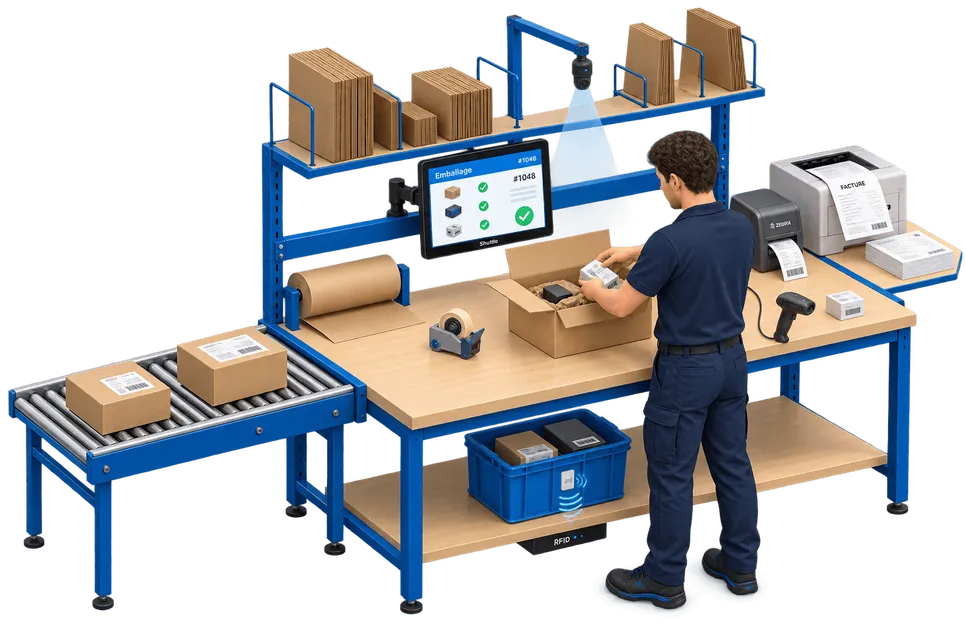
The Workstation: packing you can prove
The packing operator scans the bin or the product, and the Workstation opens the right order with the client's packing instructions.
Each item is scanned into its parcel, the label and documents print on their own, and the order is closed only when its label is scanned on the parcel.
What the Workstation does for your warehouse
The right label on the right parcel
An order is closed by scanning its own label. A label that belongs to another order is refused, so parcels are not shipped with the wrong label.
Video of every packing
A camera over the desk records each packing session automatically and links the video to the order. Your clients can retrieve it when an end customer disputes a delivery.
Manual changes need a supervisor
If an item cannot be scanned and is confirmed by hand, the Workstation can require a supervisor's badge, one approval per change.
Labels and documents print automatically
Shipping label, invoice, delivery note and customs documents print during packing, and the operator is reminded when a document must go inside the parcel.
Large orders split across parcels
An order too big for one box goes into several parcels, each with its own label and its own recorded contents.
Boxes and materials counted for billing
The box and the packing materials used are recorded per order, so they can be invoiced to the client.
Returns checked item by item
In returns mode, each returned item is scanned and marked compliant or non-compliant, with the reason recorded.
06 · One record
One record, as it happens
Every scan on a PDA or a Workstation is recorded against the person who made it. Warehouse managers see it in the back office as it happens.
Your clients' systems receive stock updates and order events through the API and webhooks, so their stock figures follow what happens in the warehouse rather than a nightly export.
The back office and the PDA are available in 10 languages, so each team can work in a language it reads.
07 · Hardware
Hardware we support
We can supply the hardware, or set up compatible devices you already own.
PDA
Unitech EA602, EA630, EA630 Plus and Mertech S55
Workstation PC
Shuttle P90U, X50V2 Plus, X50V6, X50V7 and X50V8
Cameras
Axis M3045-V, M3075-V and M3085-V, Hikvision, TP-Link VIGI C240
Scanners
Datalogic Gryphon and Magellan 1500i, Zebra DS2200 and DS2278
Label printer
Zebra ZT400
Badge readers
Parallax RFID USB 28340, iDTRONIC LF NEO 2
See the three screens with your own processes
Request a demo and we will show you the back office, the PDA and the Workstation on the processes that matter to your warehouse.